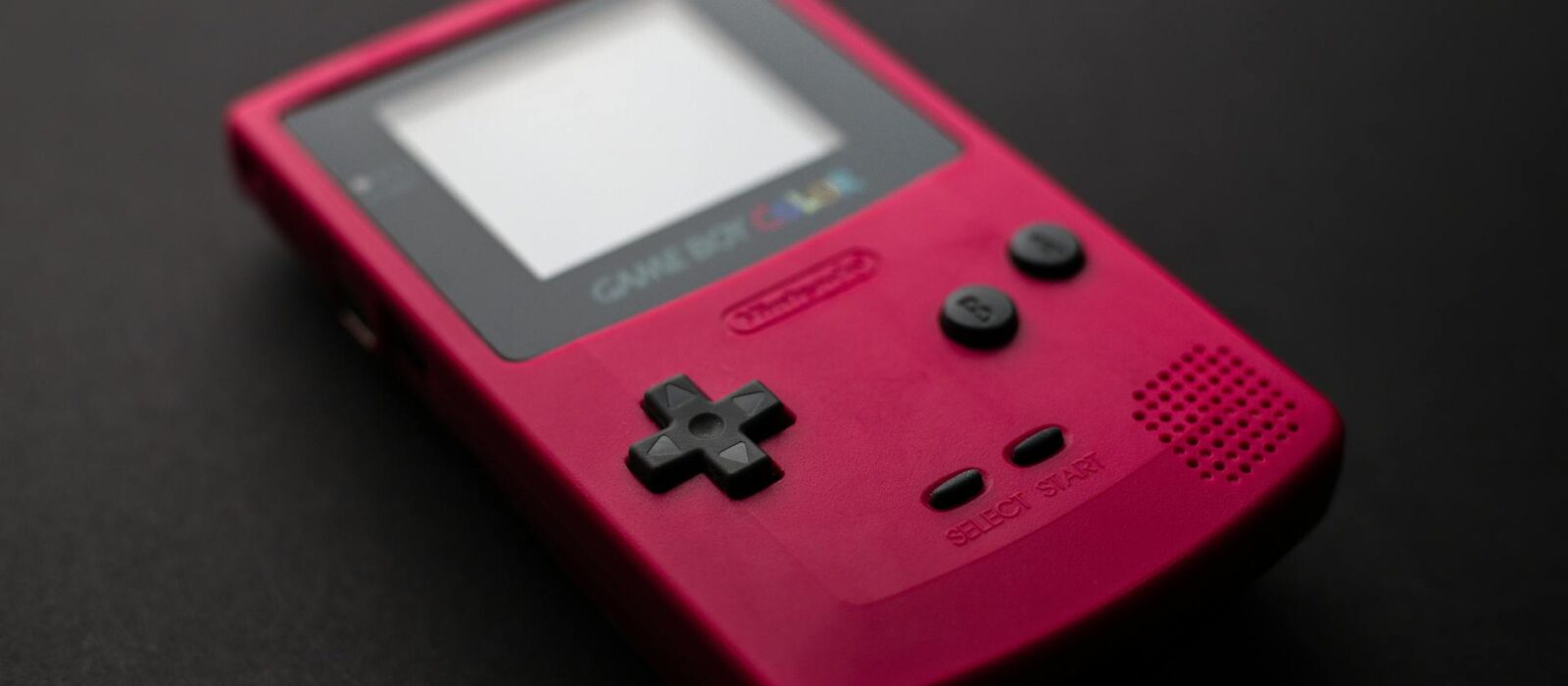
🏆 Editor’s Top Pick
Nintendo GameCube
Best for: The core of the setup
Amazon UK · Affiliate link
There’s a specific kind of disappointment reserved for the things you wanted to love. For me, back in 2003, that was Nintendo’s Game Boy Player. The promise was intoxicating: my entire Game Boy, Game Boy Color, and Game Boy Advance library, finally playable on a proper television. No more squinting at a non-backlit screen, no more burning through AA batteries. It felt like the future. The reality, however, was a smudgy, interlaced, and strangely laggy mess that never felt quite right. The official boot disc that ran the hardware was a classic case of Nintendo snatching mediocrity from the jaws of victory.
For years, that was the end of the story. The Game Boy Player was a neat novelty, a fun but flawed accessory for the wonderful Nintendo GameCube. But in the world of retro gaming, nothing ever truly dies; it just waits for a dedicated community to fix it. That fix, a piece of homebrew software called Game Boy Interface (or GBi), didn’t just improve the Game Boy Player. It utterly transformed it. It elevates the experience from a blurry compromise to arguably the single most authentic, pixel-perfect, and responsive way to play GBA cartridges on a screen that isn’t attached to the original handheld.
GBi is a piece of homebrew that makes the Nintendo GameCube’s Game Boy Player do what Nintendo’s official boot disc never managed: output clean, lag-free, pixel-accurate Game Boy Advance games to a screen. The setup requires a GameCube, the Game Boy Player attachment, and a burned GBi disc. In 2026, it’s one of the more involved ways to play GBA games on a TV — and arguably the best.
Whether the effort is still justified is a reasonable question. Analogue makes the Pocket, which plays original cartridges with FPGA accuracy and has HDMI out. The Miyoo Mini Plus handles GBA at near-perfect emulation. Nintendo Switch Online includes a small GBA library. All of these are easier. The question is whether any of them replicate what a real GBA running through the Player actually delivers — and the honest answer is that some things can’t be emulated yet.
| Item | Price (UK) | Why It Matters | Buy |
|---|---|---|---|
| Nintendo GameCube (DOL-001) | £40-£80 | The core console. DOL-001 model is vital for the best video output. | Buy → |
| Nintendo Game Boy Player | £81.48-£100 | The official hardware that reads your GBA, GBC, and GB cartridges. | Buy → |
| PicoBoot Modchip Kit | £13.03-£25 | A cheap and essential mod for launching homebrew software like GBi. | Buy → |
| GameCube Component Cable | £50-£80 | Crucial for getting the clean 480p signal needed for the best picture. | Buy → |
What Was the Game Boy Player, Anyway? A Flawed Masterpiece
To understand why GBi is so revolutionary, you first have to appreciate how profoundly Nintendo fumbled the original software. Released in mid-2003, the Game Boy Player was a chunky slab of purple plastic that bolted onto the bottom of the GameCube, connecting via the high-speed parallel port. It was, in essence, a complete Game Boy Advance crammed into a box, using the GameCube for power, controller input, and video output. The concept was brilliant, a direct continuation of the Super Game Boy idea from the SNES era, but updated for the 32-bit handheld generation.
The problem was the boot disc. To use the accessory, you had to have the official Game Boy Player disc in the GameCube’s drive. This disc contained the software that acted as the bridge between the GBA hardware inside the player and the GameCube’s output. And it was terrible. The single most egregious flaw was its video output. The Game Boy Advance has a native resolution of 240×160 pixels, a progressive scan signal (240p). This is standard for most retro consoles. Instead of outputting this clean signal, Nintendo’s software took the 240×160 image, applied a soft, blurry scaling filter, and then output it as a 480i (interlaced) signal.
For anyone using a CRT television at the time, this was bad enough, resulting in a flickery, soft image that lacked the razor-sharp pixels we loved. On a modern flat-panel display, it’s a catastrophe. Most modern TVs don’t handle 480i well, subjecting it to aggressive, laggy deinterlacing that compounds the softness and introduces significant input delay. On top of the blurry visuals, Nintendo’s software added a reported 22-66ms of input lag before your television even got its hands on the signal. For fast-paced games like Metroid Fusion, WarioWare, Inc., or F-Zero: Maximum Velocity, this made the experience feel sluggish and unresponsive. It was a fundamental betrayal of the GBA’s snappy, immediate feel. The final insult was the forced borders and limited scaling options. You were trapped with a small picture window surrounded by a choice of garish, pre-set bezels. It was a functional solution, but one that showed a baffling lack of respect for the source material.
The hardware itself was perfect—it’s real GBA silicon, offering 100% accuracy that emulation can only dream of. The potential was immense. But it was suffocated by software that treated the GBA’s library as a second-class citizen. It felt like a rushed job, designed to be ‘good enough’ for kids, but a source of constant frustration for the enthusiasts and purists who formed the core audience for such a device. This discrepancy between the hardware’s potential and the software’s poor execution created a vacuum, a problem waiting for a solution. And that solution would come from the homebrew community.
Enter GBi: The Homebrew Fix That Changed Everything
For years, the Game Boy Player’s flaws were just a known, unfixable frustration. You either tolerated the blur and lag, or you stuck to playing on a handheld. That all changed when a developer known as Extrems released the first versions of the Game Boy Interface (GBi). This wasn’t a patch or a mod for Nintendo’s disc; it was a complete, ground-up replacement, a tiny piece of software designed to do one thing: talk directly to the Game Boy Player hardware and unlock its true potential.
The core genius of GBi is that it bypasses Nintendo’s entire software layer. When you boot GBi on a modded GameCube, it takes control and accesses the GBA hardware within the player directly. This means it isn’t bound by any of the bizarre and limiting decisions Nintendo made. Instead of taking the 240p signal and mangling it into 480i, GBi can preserve that native, progressive-scan output. It can deliver the GBA’s video signal to the GameCube’s video encoder in its purest form. This is the key to everything. Suddenly, the image quality wasn’t dictated by Nintendo’s blurry scaler, but by the clean, raw output of the hardware itself.
GBi comes in several flavours, each tailored to a specific use case. The standard version is for general use, but there are also low-latency versions (LL) that prioritise speed, and high-fidelity versions (HF) that offer incredible levels of customisation for video and audio. You can fine-tune timings, adjust colours, and manage resolutions with a precision that Nintendo’s official software could never have imagined. It turns the Game Boy Player from a simple plug-and-play device into a powerful, enthusiast-grade tool for experiencing the GBA library. You can control the exact aspect ratio, from the native 3:2 to a pixel-perfect integer scale that looks unbelievably sharp on a modern display. No more forced borders, no more blurry filters. Just the pixels, exactly as the developers intended.
The impact on input lag is just as profound. By cutting out Nintendo’s bloated software, GBi slashes the built-in latency. Using the low-latency versions, the input lag is reduced to mere fractions of a frame, making it effectively imperceptible. Playing a demanding action game like Castlevania: Aria of Sorrow through GBi feels identical to playing it on an actual Game Boy Advance. The controls are immediate, responsive, and precise. This is something that even good emulation can struggle with. The combination of real hardware for game execution and hyper-optimised software for the interface creates a best-of-both-worlds scenario. It’s the authenticity of original hardware with the quality-of-life features of modern software. This is why, for over a decade, GBi has been the secret weapon for Game Boy purists. It’s not just a small improvement; it’s a night-and-day transformation that makes the original Nintendo disc completely and utterly obsolete.
The GBi Difference: A Technical Deep-Dive into 240p Perfection
The magic of Game Boy Interface lies in its meticulous handling of the video signal, a process that stands in stark contrast to Nintendo’s original, brutish approach. To truly grasp the difference, we need to talk about resolution and scan types. The Game Boy Advance’s native resolution is 240 pixels wide by 160 pixels high, delivered progressively. This means every frame, the display draws all 160 lines in order from top to bottom. This is commonly referred to as 240p. It’s the standard for almost every console of the 8-bit and 16-bit eras and is responsible for that signature, crisp pixel look.
Nintendo’s official software completely disregarded this. It took the 240p output, performed a soft, non-integer scale to increase its size, and then converted it to 480i for output. The ‘i’ stands for interlaced, a technique developed for broadcast television where each frame is split into two fields: one with the odd-numbered lines, one with the even. This creates the illusion of higher resolution but introduces combing artefacts (nasty jagged edges) on fast-moving objects and an overall flicker. On a modern LCD or OLED TV, which are inherently progressive, this interlaced signal must be “deinterlaced”—a process where the TV’s internal processor tries to guess what a full progressive frame should look like. This process is almost always ugly, adding blur and, most critically, a significant amount of input lag. This is the core reason why the original Game Boy Player feels so wrong; it’s being forced through two separate, damaging video processing stages before it even hits your screen.
GBi’s approach is to respect the source. It grabs the 240x160p signal directly from the hardware and can do several things with it, all of them better than the original disc.
Native 240p Output
For purists with a CRT monitor or a high-quality upscaler, GBi can output a true 240p signal. This is the holy grail. When fed into a CRT, the image is flawless, with perfect scanlines and zero flicker. It looks exactly as you’d imagine a giant, perfect Game Boy Advance screen would. When fed into an upscaler like a RetroTINK 5X-Pro or an OSSC, this clean 240p signal can be perfectly line-doubled or tripled to 480p, 720p, or 1080p with razor-sharp pixels and no added lag. This is how you make GBA games look incredible on a 4K TV. You can even add your own custom scanlines or CRT effects, giving you far more control than Nintendo’s crude filters. Anyone serious about picture quality should read our guide on how to get perfect CRT shaders, as the principles are the same.
Clean 480p Output
Using a GameCube with a digital-out port (the DOL-001 models) and a quality component cable or HDMI adapter, GBi can also output a direct 480p signal. It does this by taking the 240×160 frame and perfectly integer scaling it, embedding the GBA image within a 480p frame. This completely bypasses your TV’s terrible deinterlacer. The result is a crisp, stable, and lag-free image. GBi gives you precise control over this scaling. You can choose a 2x scale (480×320) or a 3x scale (720×480, which is then downscaled slightly to fit the 640×480 frame) for the largest possible picture with minimal softness. This precision is what emulation strives for, but here it’s being done with the output of the original hardware. The difference in clarity between this and the official disc’s 480i output is not subtle; it’s like going from a blurry VHS tape to a Blu-ray.
This technical superiority is the entire point. GBi treats GBA games with the respect of a museum curator, preserving every pixel. Nintendo’s software treated them like a worn-out rental, to be smudged and distorted until they were just about recognisable.
Getting Started in 2026: Your GBi Shopping List
So, you’re convinced. You want to experience this GBA-on-TV nirvana for yourself. The good news is that in 2026, assembling the necessary kit is easier and more affordable than ever. The bad news is that it’s not a simple plug-and-play affair. You’re going to need a few specific pieces of hardware and a willingness to do a tiny bit of tinkering. Here’s your essential shopping list for the ultimate Game Boy Player setup in the UK.
- A DOL-001 Nintendo GameCube: This is the most crucial component. Only the original launch model GameCube (model number DOL-001, visible on the bottom sticker) has the Digital AV Out port. This is essential for getting the best quality 480p signal using component cables or an HDMI adapter. The later DOL-101 models removed this port, leaving you stuck with composite or S-Video, which completely defeats the purpose of using GBi for quality. You can find them on eBay or at retro game shops for around £40-£80.
- A Nintendo Game Boy Player: The accessory itself. These are region-free, so any unit will work. The price has crept up over the years due to demand from the GBi community, so expect to pay between £60 and £100 for one without the now-useless boot disc. Make sure it comes with the plastic screws to attach it securely to the GameCube.
- A Homebrew Boot Method: You need a way to launch the GBi software instead of a game disc. The absolute best method in 2026 is a PicoBoot modchip. This involves some simple soldering inside the GameCube to install a Raspberry Pi Pico board. It’s cheap (around £20 for a kit) and extremely reliable. Our full PicoBoot GameCube mod review covers the process in detail. Once installed, the GameCube will boot Swiss (a homebrew utility) from an SD card, which you then use to launch GBi.
- An SD Card Adapter: To hold the Swiss and GBi software, you’ll need an SD card adapter for the GameCube. The most common and tidy solution is the SD2SP2, a tiny adapter that plugs into the Serial Port 2 on the bottom of the console. They cost less than a fiver online. You’ll also need a micro SD card, but a small one (2-4GB) is more than sufficient.
- High-Quality Video Cables: Do not use the standard composite cable that came with the GameCube. To get that clean 480p signal from your DOL-001, you need to use the Digital AV Out. Your options are:
- Official Nintendo Component Cables: The original, holy grail option. They provide a flawless analogue component signal but are now absurdly expensive, often fetching £200-£300. Avoid unless you’re a serious collector.
- Third-Party Component Cables: Brands like Carby and Insurrection Industries make superb quality component cables that are indistinguishable from the originals in performance, costing around £70-£80. This is the best option for connecting to a CRT or an analogue-friendly upscaler like the RetroTINK.
- HDMI Adapters: The most convenient option for modern TVs. Devices like the Carby HDMI or EON GCHD Mk-II plug directly into the digital port and output a clean, lag-free 480p HDMI signal. They cost around £60-£90 and are the simplest way to get a great picture.
Once you have these parts, the process is straightforward: install the PicoBoot, format your SD card, copy over the latest versions of Swiss and Game Boy Interface, plug it all in, and you’re ready to go. The total cost for this project, assuming you’re starting from scratch, will likely be in the £150-£250 range. It’s a significant investment, but one that pays dividends in quality and authenticity for years to come.
Upscaling GBi: Making GBA Look Stunning on a Modern 4K TV
You’ve assembled your GBi-powered GameCube. You’re outputting a beautiful, clean 480p signal via an HDMI adapter. You plug it into your massive 65-inch 4K OLED TV, boot up The Legend of Zelda: The Minish Cap, and… it looks a bit soft. And small. What gives? The problem isn’t your GBi setup; it’s your television. Most modern TVs are designed to make 1080p and 4K content look amazing. They are, frankly, rubbish at handling low-resolution retro signals like 480p. The built-in scalers in 99% of consumer televisions are cheap, blurry, and often add input lag. They take your pristine 640×480 image and apply a soft, bilinear filter to stretch it to 3840×2160, destroying all that lovely pixel definition in the process.
This is where external video upscalers come in. These are dedicated devices that sit between your console and your TV, designed specifically to handle retro game resolutions with the care and precision they deserve. For a GBi setup, an upscaler is the final, transformative piece of the puzzle that elevates the experience from “very good” to “absolutely breathtaking.” The king of the hill in 2026 is still the RetroTINK 5X-Pro. It takes the 480p component or HDMI signal from your GameCube and can scale it perfectly to 1080p or 1440p. Critically, it uses “sharp” or “integer” scaling, meaning there’s no added blur. Pixels remain as crisp blocks, not fuzzy blobs. A 480p signal can be perfectly line-tripled to 1440p (480 x 3 = 1440), which looks incredibly sharp on a 4K display.
The real magic of the RetroTINK is its fine-grained control. You can adjust the scaling, aspect ratio, and add custom, high-quality scanline filters that convincingly mimic the look of a CRT monitor. These are a world away from the crude, dark-line overlays found in most emulators. They look authentic and can add a wonderful texture to the GBA’s vibrant pixel art. Firing up Golden Sun with a 1080p integer scale and some subtle aperture grille scanlines is a revelation. The colours pop, the sprites are razor-sharp, and it feels like you’re playing on some mythical, studio-grade GBA monitor.
Of course, a RetroTINK 5X-Pro is a serious investment, typically costing around £300. Is it essential? No. You can get a great experience plugging a Carby HDMI adapter directly into your TV and using your TV’s “Game Mode”. As we’ve explored in our feature on Modern TV Game Mode vs. Retro Gaming, this will minimise lag, but you’ll still be at the mercy of your TV’s soft scaler. If you are a stickler for image quality and have invested this much time and money into the perfect GBA setup, an upscaler is the component that does your hard work justice. It ensures that the pristine signal GBi is producing is delivered to your eyeballs without being vandalised by your TV’s cheap processing. It’s the difference between a good home-cooked meal and a Michelin-starred dish using the exact same ingredients. The quality is already there; the upscaler is just the final, expert presentation.
GBi vs. The Competition: Analogue Pocket, MiSTer, and High-End Emulation
The GBi setup is undeniably brilliant, but it doesn’t exist in a vacuum. The retro gaming landscape of 2026 is rich with incredible ways to play GBA games, each with its own set of pros and cons. So how does our souped-up GameCube stack up against the three main rivals: the Analogue Pocket, the MiSTer FPGA, and high-end software emulation?
vs. The Analogue Pocket
The Analogue Pocket is the GBi’s closest spiritual sibling. It’s a stunningly well-made handheld that uses an FPGA (Field-Programmable Gate Array) to replicate the GBA’s original chipset in hardware. This means it’s not emulation; it’s a cycle-accurate hardware recreation that plays original cartridges flawlessly. Its 1600×1440 screen is exactly 10x the resolution of the GBA, allowing for perfect integer scaling and the sharpest GBA image you’ve ever seen on a handheld. The optional dock allows you to play on a TV, much like the GBi. The Analogue Pocket wins hands-down on convenience and portability. It’s a single, beautiful device that just works, right out of the box. However, the GBi setup has two key advantages: cost and controller choice. A full Pocket and Dock setup will set you back well over £300, whereas a GBi setup can be built for half that. More importantly, with GBi you’re using a proper, full-sized controller like the excellent GameCube pad or even a SNES controller via an adapter. For long sessions on the TV, this is far more comfortable than the Pocket’s small form factor.
vs. MiSTer FPGA
The MiSTer is an open-source project that uses a more powerful FPGA board to replicate dozens of classic consoles, including an exceptionally accurate GBA core. For the dedicated enthusiast, a MiSTer setup is the ultimate all-in-one retro machine. The GBA core is phenomenal, offering accuracy on par with the GBi and a wealth of video options. The main advantage of MiSTer is its versatility; you get a perfect GBA, SNES, Mega Drive, and so much more in one box. Its main disadvantage compared to GBi is the loss of that physical connection. MiSTer runs ROM files from an SD card; it cannot play your original cartridges. For many, the ritual of collecting and using physical carts is a huge part of the hobby. The GBi setup honours this, allowing your original game collection to shine on the big screen. The GBi is a dedicated specialist; the MiSTer is a master of all trades.
vs. High-End Software Emulation
This is the most common way people play GBA games today. A powerful Android handheld like the AYN Odin 2 or even a Steam Deck can run GBA games via emulators like RetroArch with near-perfect results. This is by far the most convenient and feature-rich option. You can use save states, fast-forward, apply shaders, and carry thousands of games in your pocket. However, even the best emulators, like mGBA, are not 100% cycle-accurate. There can be tiny, almost imperceptible timing differences or audio glitches in a handful of games. More noticeably, software emulation will always have a few extra frames of input lag compared to a real-hardware solution like GBi. For 95% of people, this doesn’t matter in the slightest. But for the purist playing a timing-critical rhythm game or a challenging platformer, that minimal latency of the GBi setup is a tangible advantage. Emulation is the pragmatic choice; GBi is the purist’s choice.
Ultimately, the GBi setup carves its own unique niche. It’s for the player who values hardware authenticity and physical media above all else, and who wants the absolute lowest latency for TV play without compromising on pixel-perfect video quality. It’s more effort than any of its rivals, but for that specific goal, it remains undefeated.
The Soul of the Machine: Why Original Hardware Still Matters
Much has been written about the technical merits of the Game Boy Player and GBi: the 240p output, the integer scaling, the minimal latency. These are all critical factors that make it a superb experience from a performance perspective. But they don’t capture the whole story. They don’t explain the enduring, almost magnetic appeal of this Rube Goldberg-esque contraption in an age of slick, convenient alternatives. The real, lasting magic of the GBi setup is less tangible. It’s about the connection to the history and physicality of the games themselves.
There is a unique and satisfying ritual to it. You select a cartridge from your shelf—a real, physical object you might have owned for twenty years. You feel the weight of it, see the scuffs on the label, maybe even blow on the contacts out of pure, ingrained habit. You click it into the slot on the Game Boy Player with a satisfying clunk. You power on the GameCube, its cheerful animation filling the screen, and then boot into the stark, functional GBi menu. It feels deliberate. It feels intentional. This process is a world away from scrolling through a list of thousands of ROMs on a handheld device. It forces you to choose one game, to commit to it, to give it the same focus you would have in 2004. This physical interaction creates a stronger connection to the experience, grounding it in the real world.
Moreover, you are playing on the actual hardware. Not an FPGA recreating the hardware, not an emulator interpreting it, but the real deal. The CPU inside the Game Boy Player is an ARM7TDMI, the same chip that powered millions of Game Boy Advance units. When you play Metroid: Zero Mission, the code is executing on the same silicon it was designed for. There are no questions of accuracy, no subtle timing bugs, no emulation quirks. It is, by definition, 100% perfect. For a certain type of enthusiast, this is the entire point. It’s about preservation and authenticity. It’s the gaming equivalent of listening to a vinyl record on a vintage turntable instead of an MP3. The digital file might be cleaner and more convenient, but the record provides a physical link to the art, complete with all its warmth and idiosyncrasies. The GBi setup is the high-fidelity turntable of the GBA world. It respects the medium, warts and all, and presents it in the best possible light without fundamentally changing its nature.
This isn’t to denigrate emulation or FPGA solutions. They are modern marvels that have made retro gaming more accessible than ever. But they offer a different kind of experience. They are libraries; the GBi is a concert hall. It’s a dedicated space built for one purpose: to let a single, authentic performance shine. In a digital world of infinite choice and fleeting attention, there’s a profound satisfaction in that singular focus.
The Verdict: Is a GBi Setup Worth the Hassle in 2026?
After laying out the history, the technical details, the cost, and the philosophical arguments, we arrive back at our original question: is building a Game Boy Player setup with GBi software the best way to experience the GBA on a TV in 2026? The answer is a clear, definitive, and heavily-caveated “yes”. It is, in my opinion, the gold standard for authentic, low-latency, cartridge-based GBA gameplay on a television. But it is absolutely not for everyone.
Let’s be blunt. For the vast majority of people, this is overkill. If you just want to casually replay Pokémon Emerald or Mario & Luigi: Superstar Saga, a £100 retro handheld running an emulator will serve you perfectly well. It will be cheaper, infinitely more convenient, portable, and packed with modern features like save states. The tiny inaccuracies and few frames of extra input lag will be completely unnoticeable and irrelevant to your enjoyment. The GBi path is one of a specialist, a purist, a tinkerer. It’s for the person who not only wants to play the game but wants to experience it on the original hardware, presented in the most flattering way technologically possible.
This is a project. It requires hunting down specific hardware models, a bit of light soldering, and learning your way around some simple homebrew software. It’s a hobbyist’s solution. But the rewards for that effort are tangible. The combination of perfect hardware accuracy, imperceptible input lag, and the sheer joy of using your original cartridges is a potent one. When paired with a quality upscaler, the image quality is truly spectacular, presenting the GBA’s beautiful sprite work with a clarity and vibrancy that even Nintendo couldn’t manage back in the day. It’s a way of honouring one of the greatest handheld libraries ever made.
Who Should Build a GBi Setup in 2026?
- The Hardware Purist: If the idea of emulation leaves you cold and you believe in the sanctity of original silicon, this is your endgame for GBA on a TV.
- The Physical Media Collector: You have a shelf full of GBA carts and you want to see them shine. This setup gives your collection a whole new lease of life on the big screen.
- The Latency-Sensitive Player: If you play rhythm games, shmups, or fighting games where every frame counts, the near-zero latency of this setup is a significant advantage over emulation.
- The Retro Gaming Tinkerer: If you enjoy the process of modifying consoles and optimising your setup as much as you enjoy playing games, this is a deeply satisfying project to undertake.
Who Should Skip It?
- The Casual Player: If you just want a quick and easy way to play some old favourites, the cost and effort are not justified. Grab a Miyoo Mini Plus or an Anbernic device.
- The Convenience-First Gamer: If you value save states, portability, and having your entire library in one place, a modern emulation handheld is a much better fit.
- The Gamer on a Tight Budget: While cheaper than an Analogue Pocket, a full GBi setup can still cost over £200. There are far more cost-effective ways to play GBA games.
In the end, the Game Boy Player with GBi is a beautiful monument to the passion of the retro gaming community. It’s a testament to how dedicated fans can take a flawed but promising piece of official hardware and, through sheer ingenuity, elevate it into something truly special. It may not be the most practical solution in 2026, but for its intended purpose, it remains the undisputed best.
Frequently Asked Questions
Is Game Boy Interface better than the original Nintendo disc?
Yes, unequivocally. The Game Boy Interface (GBi) is superior in every single measurable way. It produces a sharper, cleaner image by outputting a native 240p or 480p signal instead of the blurry 480i of the original disc. It has significantly less input lag, making games feel far more responsive. GBi also offers a vast array of customisation options for aspect ratio, colour, and audio that the official software lacks. The Nintendo disc is completely obsolete if you have any way to run homebrew.
Do I need to mod my GameCube to use GBi?
Yes, you need a way to run homebrew software. In 2026, the best and most common method is installing a PicoBoot modchip, which requires some basic internal soldering. This allows you to boot the Swiss homebrew launcher from an SD card, which you then use to load the GBi software. Older methods involving hacked game saves exist but are far more cumbersome and less reliable than a modern solution like PicoBoot.
What is the best video output for a GBi setup?
For the absolute best quality, you need a DOL-001 model GameCube that has the Digital AV Out port. From there, you can use high-quality third-party component cables (from brands like Carby or Insurrection Industries) to get a pristine 480p analogue signal. This is ideal for connecting to a CRT or an external upscaler like a RetroTINK. For direct connection to a modern TV, a dedicated HDMI adapter like the Carby HDMI adapter is the most convenient option, providing a clean, lag-free 480p signal over HDMI.
Does GBi work with Game Boy and Game Boy Color games?
Yes, it does. The Game Boy Player hardware is essentially a full Game Boy Advance, which includes the necessary processor to play original Game Boy (DMG) and Game Boy Color (GBC) cartridges. GBi fully supports this backwards compatibility, presenting GB and GBC games with the same pixel-perfect accuracy and low latency as GBA titles. It’s an absolutely superb way to play your entire Game Boy family library.
Is a GBi setup cheaper than an Analogue Pocket?
Generally, yes. As of 2026, a full Analogue Pocket setup with the console and the TV dock will likely cost upwards of £300 in the UK. A complete GBi setup, assuming you buy all the parts second-hand (GameCube, Player, cables) and a new PicoBoot modchip, can typically be assembled for between £150 and £250. It requires more effort and sourcing of parts, but the final cost is usually significantly lower for a TV-focused setup.
Can I use a WaveBird controller with the Game Boy Player?
Absolutely. The Game Boy Player uses standard GameCube controller ports, so any official or third-party GameCube controller will work, including the legendary wireless WaveBird. Playing your favourite GBA RPG from the comfort of your sofa with a wireless controller is a fantastic experience and one of the big advantages this setup has over using a tethered handheld.
Does GBi add any input lag?
The standard versions of GBi have an incredibly low input lag, measured at less than a single frame. For the most demanding players, there is a “low latency” (LL) version of the software that reduces this even further to a practically non-existent level. Compared to the official Nintendo disc, which added several frames of lag, GBi is a massive improvement and feels as responsive as playing on original handheld hardware.
What to Read Next
If you found this deep-dive into the Game Boy Player useful, here are a few other articles that explore the world of retro gaming on modern hardware:
- PicoBoot GameCube Mod Review: Is It Worth £20 in 2026 UK? — A detailed guide and verdict on the essential mod for unlocking the power of your GameCube and running software like GBi.
- AYN Odin 2 Review: Worth £400 for GameCube in 2026 UK? — See how the GBi experience compares to high-end emulation on one of the most powerful retro handhelds available today.
- Modern TV Game Mode vs. Retro Gaming UK (2026): The Truth — Understand why getting a clean signal from your console is only half the battle, and how your TV can make or break the experience.
✓ Recommended by Sarah Hargreaves
Recommended based on community testing data, benchmark results, and verified UK pricing — we only link products that earn it.
- Nintendo GameCubeBest for: The core of the setup
- Nintendo Game Boy PlayerBest for: Required for GBA/GBC/GB carts
- PicoBoot ModchipBest for: Easiest way to run homebrew
- CARBY Component CableBest for: Best analogue video quality
- RetroTINK 5X-ProBest for: High-end upscaling for modern TVs
- Game Boy Advance GameBest for: The reason to do all this
RetroInHand earns a small commission from qualifying Amazon UK purchases at no extra cost to you.
Conclusion
The journey to the perfect Game Boy Player setup is a testament to the enduring passion of the retro community. It’s a refusal to accept the ‘good enough’ solution that Nintendo offered and a relentless pursuit of the quality the original hardware was always capable of. The Game Boy Interface software is the key that unlocks that potential, transforming a flawed accessory into the definitive way to experience GBA cartridges on a television.
It’s not the easiest, cheapest, or most convenient path in 2026. But for those who cherish the physicality of cartridges and demand the authenticity of original hardware, it offers a reward that no emulator or FPGA clone can quite replicate. It’s a celebration of the Game Boy Advance, presented with the respect and technical excellence it always deserved.
Now that you know how to achieve GBA perfection on the big screen, the next question is how to best experience these classics on the move. The world of modern retro handhelds offers a completely different, but equally compelling, set of solutions, each with its own compromises and triumphs.
📚 Related: Browse the full HDMI & Display Fix Hub — all UK retro gaming guides in one place.



This article was produced with AI assistance and reviewed by the editor. See our Editorial Standards.